How to opt-out a customer from your surveys and campaigns
You can opt-out a customer from future surveys and campaigns, for customers who (a) exist in your LoyaltyLoop account, (b) preemptively for customers who do not yet exist in your account, (c) all contacts using the same email domain, or (d) uploaded in a pending launch in the Launch Pad.
(a) Opt-Out a customer that exists in your LoyaltyLoop account:
- To access your opt-out list, navigate to Customers from the left main menu.
- Search for the contact or contacts in question
- Select the contact you wish to opt-out
- Under the Actions column, click the opt-out icon (with person) to opt-out that one contact from all future communications.
- If you have more than one contact you wish to opt-out, you can also select them in the table, then click the button above the table "Opt-Out"

While the opt-out is added as soon as it is entered, it can take up to 2 business days to get completely through our system.

Also, opt-outs are based on the customer's email address. If your customer uses more than one email address with your business, make sure to add all their email addresses to your opt-out list.
(b) Preemptively opt-out a customer that does not yet exist in LoyaltyLoop
- Click Customers for the left main menu
- Click the plus (+) button in menu bar
- On the next screen, enter the customer's email address (and other data as desired), and set the Status to "opt-out"
- Click Save Changes
(c) Opt-out an entire domain in LoyaltyLoop
- Click Customers for the left main menu
- Click Opted out Domains header
- Click the (+) button
- Fill the form by entering the email domain (without @)
- Save Changes
(d) Edit survey launch contacts through the Launch Pad
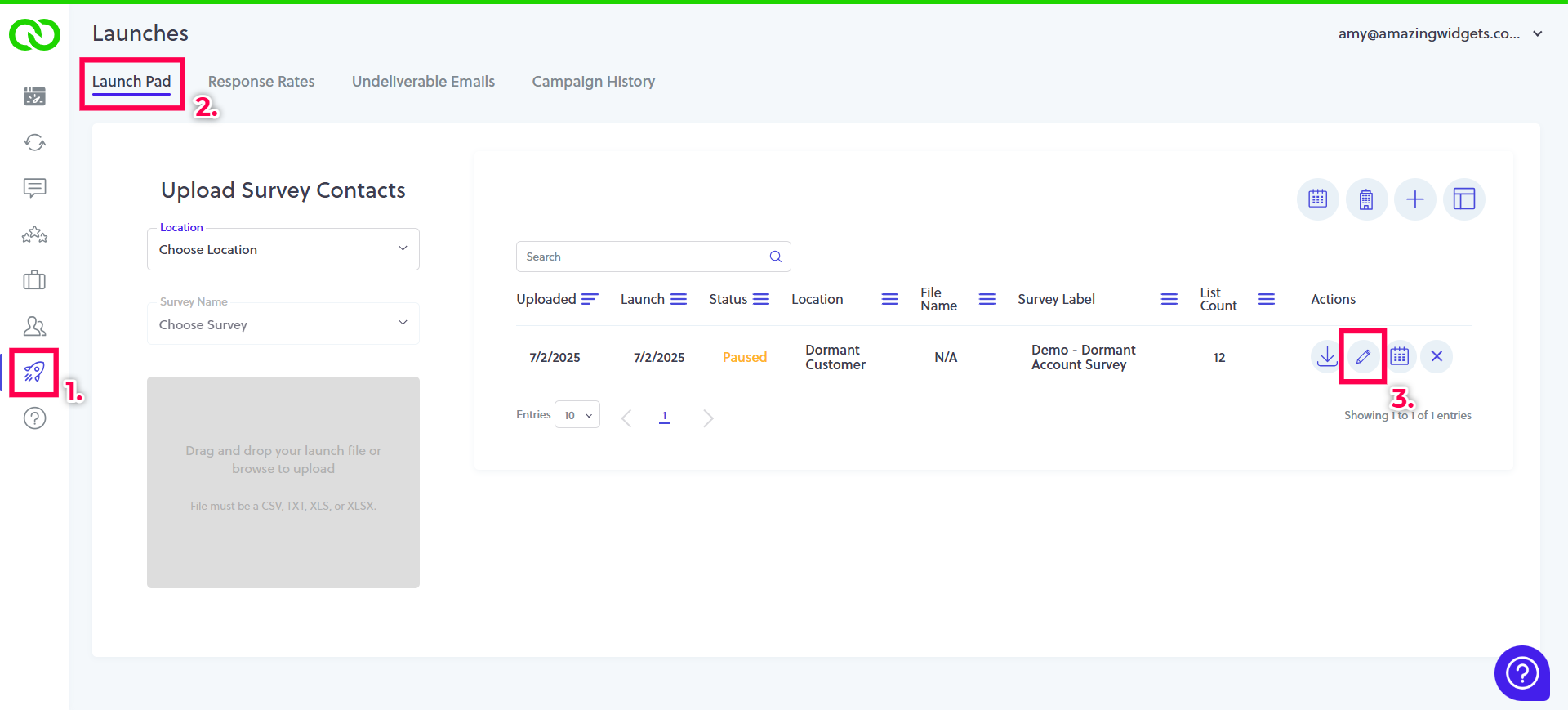
From the left main menu, (1) select the Launch Icon. If you have a launch list available, you will see the file in your (2) Launch Pad. To review the list, (3) select the 'Edit' icon.
Now, review your list of contacts. There are 3 statuses available to each contact.
- Include = The contact will be included in your campaign and receive a survey invitation.
- Skip = The contact will be skipped from this campaign, but will be eligible to be included in future LoyaltyLoop campaigns.
- Opt-Out Always = The contact will be add to your LoyaltyLoop Opt-Out list and excluded from this and all future LoyaltyLoop campaigns.
By default, your contacts are included in the campaign, but (4) using the drop down box you can 'Skip' contacts from this upcoming campaign or 'Opt-Out Always' which removes the contacts from all future LoyaltyLoop campaigns. Once you have finished editing your contact list, (5) click 'Return to Launch Pad'.