How do I email launch files to LoyaltyLoop?
You can email your launch files to us by sending them to your location's unique Launch File Email Address. To get your location's Launch File Email Address, click your username and then Settings. Under the Data Management section of your Location, click Launch File Email Address. On the next screen (shown below), simply click the Copy button to save your Launch File Email Address to your clipboard.
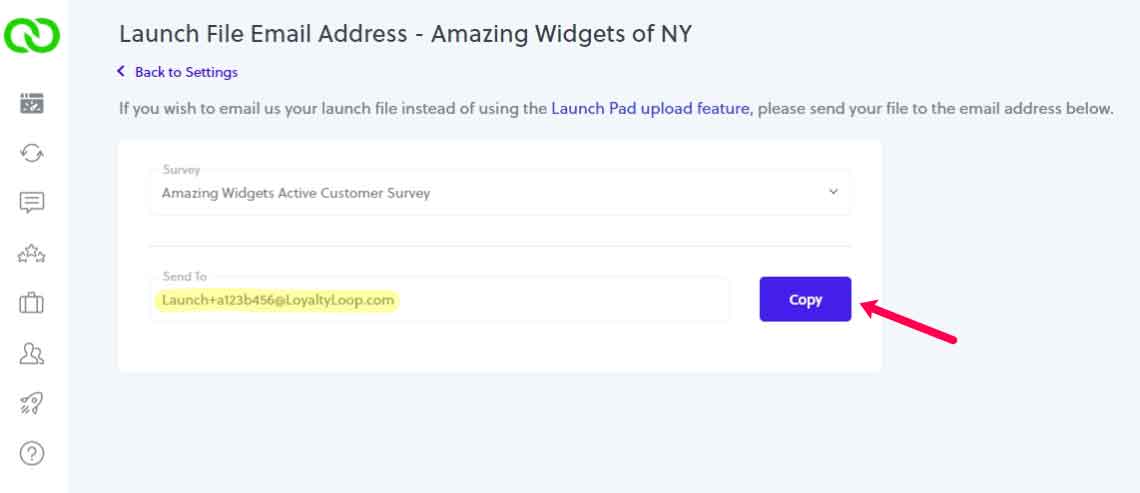
Whenever you wish to email us launch data for that location's survey, simply email them to that unique Launch File Email Address.
If you have more than one location, you'll have a unique Launch File Email Address for each location. Simply email that location's launch data to its unique Launch File Email Address.
Related Articles
How do I upload launch files to LoyaltyLoop?
To upload your launch file(s), go to Launches from the left main menu. This will land you on the Launch Pad. Then select, (1) the location, and (2) the survey you wish to send. Then, (3) drag & drop the file(s) associated with this specific ...
LoyaltyLoop Survey Launch Schedule
To ensure high response rates, LoyaltyLoop surveys launch Monday through Friday, excluding US Federal and company holidays, as per below: 2025 Company-Observed Holidays (Suspended Survey Launches) Day Holiday Wed, Jan 1 New Years Day Mon, Jan 20 ...
LoyaltyLoop Business Rules Explained
One of the unique qualities of LoyaltyLoop is the option to set “Business Rules” that tune your customer surveys to your specific business, ensuring the correct customers are engaged for feedback at the right time. Once configured, these rules become ...
How do I get my launch data into LoyaltyLoop?
There are 4 methods you can use to deliver your survey launch data to LoyaltyLoop: Automatically uploaded via one of our integrations (API or Zapier) Upload it on the Launch Pad (found on your Launches page) Emailed to us using your location's unique ...
LoyaltyLoop Live Training Classes
Need a refresher on LoyaltyLoop features and functionality? Trying to learn something specific? Looking to increase your knowledge on measuring your customer’s experience or anything related to your LoyaltyLoop service. While you can always book a ...